I’m trying to pump up myself to write a piece of text about psychopathy. All three other group members already wrote their part. We’re making a scientific poster titled “Is there a psychopath hidden in your brain?” But, do I even want to know? It’s all very close to home, with a mother who’s been accusing her ex-husband (my dad) of being a psychopath for, like, forever, and, simultaneously, this monkey in my brain, pointing it’s accusative little finger straight at me.
Page 18 of 52
There are many clever ways to tell you this. There are many ways to deceive. But in the end I feel that more often than not the deception merely serves to reinforce that image of a very vulnerable naked man.
Thus: “I am naked and feeling very vulnerable.”
Since I moved my LDAP wiki over from DokuWiki to MediaWiki, I’ve been burried by a daily torrent of spam. Just like with my tropical timber investments wiki, the ReCaptcha extension (with pretty intrusive settings) doesn’t seem to do much to stop this shitstream.
How do the spammers do this? Do they primarily trick visitors of other websites into solving this captchas for them or do they employ spam-sweatshops in third-world countries? Fuck them! I’m trying something new.
I’ve upgraded to the ConfirmEdit extension. (ReCaptcha has also moved into this extension.) This allows me to try different Captcha types. The one I was most interested in is QuestyChaptcha, which allows me to define a set of questions which the user needs to answer. I’m now trying it out with the following question:
$wgCaptchaQuestions[] = array( 'question' => "LDAP stands for ...", 'answer' => "Lightweight Directory Access Protocol" );
I don’t think it’s a particularly good question, since it’s incredibly easy to Google. But, we’ll see, and in the mean time I’ll try to come up with one or two questions that are context-sensitive, yet easy enough to answer for anyone with some knowledge of LDAP. If you have an idea, please leave a comment.
Yesterday, while helping Caloe with the website for her company De Buitenkok, I came across the mother of all stupid bugs in Safari. Me having recently announced payformystay.com, I loaded it up in Apple’s hipster browser only to notice that the CSS wasn’t loaded. Oops!
Reloading didn’t help, but … going over to the development version, everything loaded just fine. Conclusion? My recent optimizations—concatenating + gzipping all javascript and css—somehow fucked up payformystay for Safari users. The 14 Safari visitors (16.28% of our small group of alpha users) I received since the sixth must have gotten a pretty bleak image of the technical abilities of payformystay.com’s Chief Technician (me). 😥
The old cat | gzip
So, what happened?
To reduce the number of HTTP requests per page for all the JavaScript/CSS stuff (especially when none of it is in the browser cache yet), I made a few changes to my build file to scrape the <head> of my layout template (layout.php), which I made to look something like this:
<?php if (DEV_MODE): ?>
  <link rel="stylesheet" type="text/css" href="/layout/jquery.ui.selectmenu.css" />                                   <!--MERGE ME-->
  <link rel="stylesheet" type="text/css" href="/layout/fancybox/jquery.fancybox-1.3.4.css" />                         <!--MERGE ME-->
  <link rel="stylesheet" type="text/css" href="/layout/style.css" />                                                  <!--MERGE ME-->

  <script src="/layout/jquery-1.4.4.min.js" type="text/javascript"></script>                                          <!--MERGE ME-->
  <script src="/layout/jquery.base64.js" type="text/javascript"></script>                                             <!--MERGE ME-->
  <script src="/layout/jquery-ui-1.8.10.custom.min.js" type="text/javascript"></script>                               <!--MERGE ME-->
  <script src="/layout/jquery.ui.selectmenu.js" type="text/javascript"></script>                                      <!--MERGE ME-->
  <script src="/layout/jquery.cookie.js" type="text/javascript"></script>                                             <!--MERGE ME-->
  <script src="/layout/fancybox/jquery.fancybox-1.3.4.js" type="text/javascript"></script>                            <!--MERGE ME-->
  <script src="/layout/jquery.ba-hashchange.min.js" type="text/javascript"></script>                                  <!--MERGE ME-->
  <script src="/layout/jquery.writeCapture-1.0.5-min.js" type="text/javascript"></script>                             <!--MERGE ME-->
<?php else: # if (!DEV_MODE) ?>
  <link href="/layout/motherofall.css.gz?2" rel="stylesheet" type="text/css" />
  <script src="/layout/3rdparty.js.gz?2" type="text/javascript"></script>
<?php endif ?>
It’s very simple: All the files with a “<!--MERGE ME-->” comment on the same line got concatenated and gzipped into motherofall.css.gz and 3rdparty.js.gz respectively, like so:
MERGE_JS_FILES := $(shell grep '<script.*<!--MERGE ME-->' layout/layout.php|sed -e 's/^.*<script src="\/\([^"]*\)".*/\1/')
MERGE_CSS_FILES := $(shell grep '<link.*<!--MERGE ME-->' layout/layout.php|sed -e 's/^.*<link .*href="\/\([^"]*\)".*/\1/')

all: layout/3rdparty.js.gz layout/motherofall.css.gz

layout/3rdparty.js.gz: layout/layout.php $(MERGE_JS_FILES)
        cat $(MERGE_JS_FILES) | gzip > $@

layout/motherofall.css.gz: layout/layout.php $(MERGE_CSS_FILES)
        cat $(MERGE_CSS_FILES) | gzip > $@
Of course, I simplified away the rest of my Makefile. You may notice that I could have used yui-compressor or something alike to minify the concatenated files before gzipping them, but yui-compressor chokes on some of the third-party stuff. I am using it for optimizing my own css/js (again, only in production).
Safari ignores the Content-Type for anything ending in .gz
As far as the HTTP spec is concerned, “file” extensions mean absolutely nothing. They’re trivial drivel. Whether an URL ends in .gz, .css, .gif or .png, what it all comes down to is what the Content-Type header tells the browser about the response being sent.
You may have noticed me being lazy in the layout template above when I referenced the merged files:
<link href="/layout/motherofall.css.gz?2" rel="stylesheet" type="text/css" />
  <script src="/layout/3rdparty.js.gz?2" type="text/javascript"></script>
I chose to directly reference the gzipped version of the css/js, even though I had a .htaccess files in place (within /layout/) which was perfectly capable of using the right Content-Encoding for each Accept-Encoding.
$ cat /layout/.htaccess
AddEncoding gzip .gz

RewriteEngine On

RewriteCond %{HTTP:Accept-Encoding} gzip
RewriteCond %{REQUEST_FILENAME}.gz -f
RewriteRule ^(.*)$ $1.gz [QSA,L]

<Files *.css.gz>
ForceType text/css
</Files>

<Files *.js.gz>
ForceType application/javascript
</Files>
You may notice that the .htaccess file contains some configuration to make sure that the .gz files are not served as something like application/gzip-compressed.
Anyway, I went to see if there were any browsers left that do not yet Accept-Encoding: gzip and could find none. When, yesterday, I was faced with an unstyled version of my homepage, my first reaction was (after the one where I was like hitting reload 20 times, embarrassedly mumbling something about “those damn browser-caches!”): “O then, apparently, Safari must be some exception to the rule that browsers have all been supporting gzip encoding for like forever!”
No, it isn’t so. Apparently Safari ignores the Content-Type header for any resource with an URL ending in .gz. Yes, that’s right. Safari understands Content-Encoding: gzip just fine. No problem. Just don’t call it .gz.
The new cat ; gzip
So, let’s remove the .gz suffix from these files and be done with it. The .htaccess was already capable of instructing all necessary negotiations to be able to properly serve the gzipped version only when it’s accepted (which is always, but I digress).
A few adjustments to my Makefile:
MERGE_JS_FILES := $(shell grep '<script.*<!--MERGE ME-->' layout/layout.php|sed -e 's/^.*<script src="\/\([^"]*\)".*/\1/')
MERGE_CSS_FILES := $(shell grep '<link.*<!--MERGE ME-->' layout/layout.php|sed -e 's/^.*<link .*href="\/\([^"]*\)".*/\1/')

all: layout/3rdparty.js.gz layout/motherofall.css.gz layout/pfms.min.js.gz

layout/3rdparty.js: layout/layout.php $(MERGE_JS_FILES)
	cat $(MERGE_JS_FILES) > $@

layout/motherofall.css: layout/layout.php $(MERGE_CSS_FILES)
	cat $(MERGE_CSS_FILES) > $@

%.gz: %
	gzip -c $^ > $@
And here’s the simple change to my layout.php template:
<link href="/layout/motherofall.css?2" rel="stylesheet" type="text/css" />
  <script src="/layout/3rdparty.js?2" type="text/javascript"></script>
That’s it. I welcome back all 14 Safari users looking for paid work abroad! Be it that you’re looking for international work in Africa, in America, in Asia or in Europe, please come visit and have a look at what we have on offer. 😉
Januari the first, a very good day to announce a new project that I’ve been working on this past year. Which I did, on Facebook and Twitter. Now, five days later, it’s time te repeat the announcement to give it some much-needed link-juice. I know that normal people don’t follow this blog. (I don’t even follow this blog!) But it does have PageRank. And it does have 4000 monthly visitors. Time for some link-whoring!
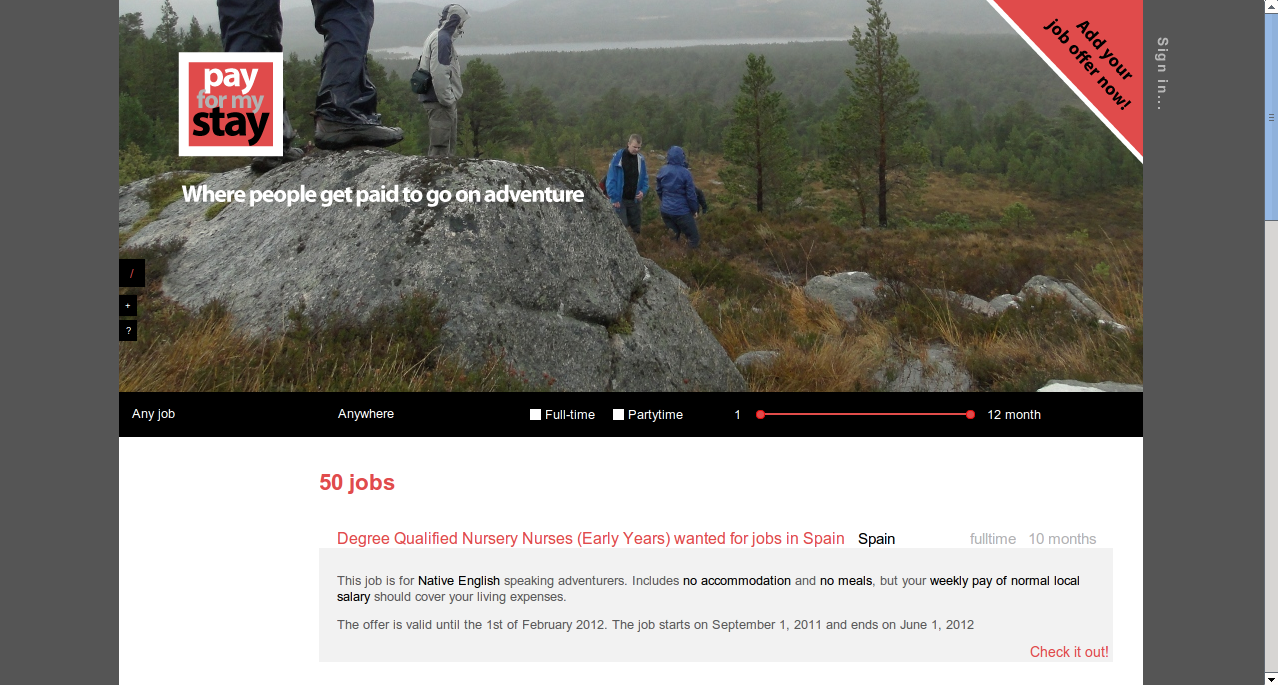
PFMS search screen - top
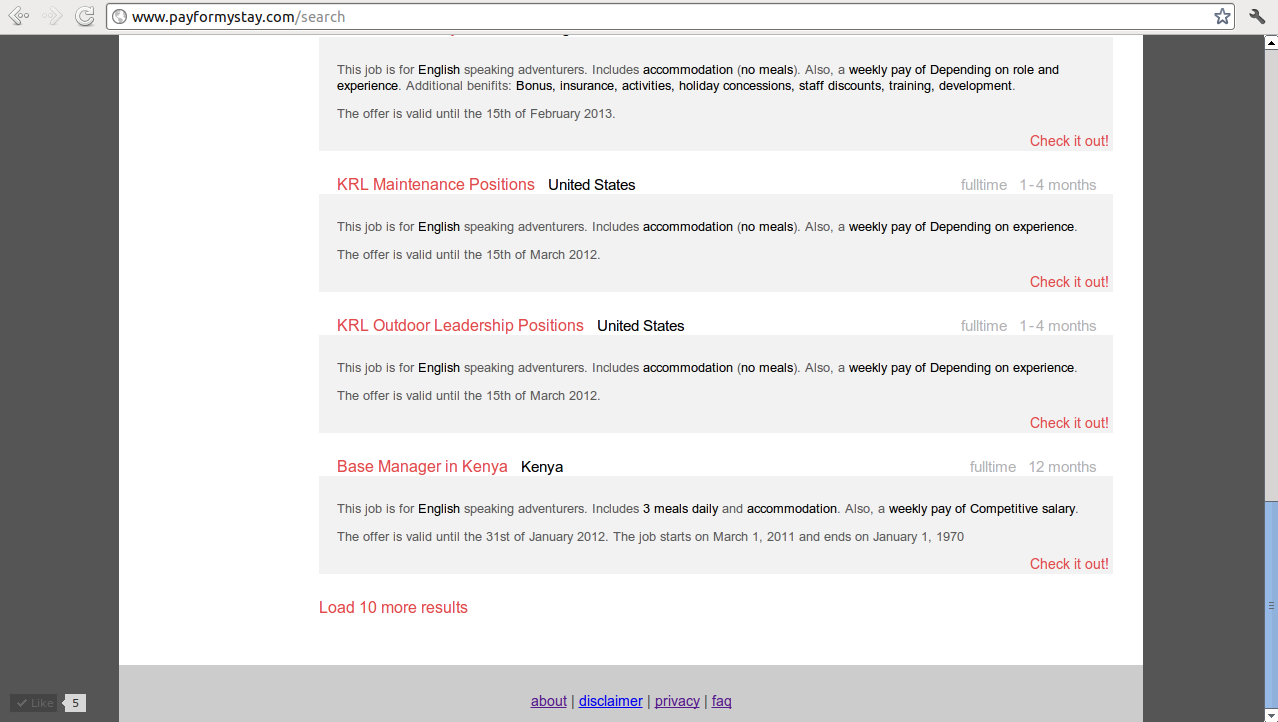
PFMS search screen - bottom
payformystay.com is a website for adventurers who’re looking for paid work abroad. Whether you want to work in Europe, work in Afrika, work in Asia, work in Australia or whether you just want to do some seasonal work anywhere but home (grape picking, strawberry harvest, whatever you fancy). Of course we have many types of work: office jobs, tourism jobs, healthcare jobs, childcare jobs, wildlife jobs, anything.
The cool thing about payformystay, though, is that we only sport paid jobs. So, no wrestling through page after page of crappy offers where some evil cunt swine tries to make you pay for your own work. That’s right! Job offers on payformystay.com must at the very least include full board (something like a bed or tent and 3 meals daily) or enough pay to cover these basic living expenses! Offers are audited and violators are fed to the spammers.
Go get yourself a piece of the action:
payformystay.com – where people get paid to go on adventure
Peace out. End of announcement.
Have fun! Be scared! Be tough! And be safe!
I’ve had some issues with Xen crashing when I wanted to create a DomU for which the Dom0 had to shrink (see bug report). Therefore, it’s better to force a memory limit on the dom0. That is done with a kernel param.
Add this to /etc/default/grub:
# Start dom0 with less RAM
GRUB_CMDLINE_XEN_DEFAULT="dom0_mem=512M"
And make sure you disabling ballooning of dom0 in /etc/xen/xend-config.sxp:
(enable-dom0-ballooning no)
Then run update-grub2 and reboot.
My Xen DomU’s that I upgraded to 11.4 no longer booted, because the xen-blkfront module is missing from the initramfs. To fix, do this when you get the initramfs prompt:
modprobe xen-blkfront
exit
Then after it’s booted:
root@ubuntu:~# echo "xen-blkfront" >> /etc/initramfs-tools/modules
root@ubuntu:~# update-initramfs -u
Also look at this post.
When you use xen-create-image to bootstrap an ubuntu, it sets up a grub config file menu.lst. However, this boot config is not kept up-to-date with newer ubuntu’s because they use grub2 (which uses grub.cfg and not menu.lst). And Xen’s pygrub first looks at menu.lst, so if you have a stale file, it will always boot an old kernel.
I ‘Fixed’ it like this (a real fix I have yet to devise, but this works. Actually, I think it is a bug):
The grub hooks in Debian and Ubuntu don’t take the fact into account that the machine might be running as paravirtualized VM. Therefore, it can’t find /dev/xvda to install grub on, which it shouldn’t try. Bug reports exist about this, but it is not deemed important, it seems. The result is that the menu.lst that was created by xen-create-image is never updated and updates to the kernel are never booted.
Pygrub considers menu.lst over grub.cfg (which would give problems with upgrading to grub2). But you can also use it to your advantage. You can edit /etc/kernel-img.conf to look like this (do_symlinks = yes and no hooks):
do_symlinks = yes
relative_links = yes
do_bootloader = no
do_bootfloppy = no
do_initrd = yes
link_in_boot = no
postinst_hook =
postrm_hook   =
And then make /boot/grub/menu.lst with this:
default         0
timeout         2

title           Marauder
root            (hd0,0)
kernel          /vmlinuz root=/dev/xvda2 ro
initrd          /initrd.img
Then uninstall grub. This way, you always boot the new kernel. (actually, I found that you can’t always uninstall grub. I now have machines with grub-pc and grub-common installed, but have an empty /boot/grub with only a menu.lst there. This will keep aptitude from complaining about grub-pc not being able to configure, because it’s unable to detect the bios device for /dev/xvda2 (or whatever)
My HP4050 has a million different drivers to choose from. Some don’t have the maximum DPI, some don’t have other options, like selecting paper output. The one that works the best seems to be “HP LaserJet 4050 Series Postscript (recommended) (grayscale, 2-sided printing)”. However, I have no idea anymore if that came from hplip, foomatic, gutenprint, or whatever.
mysqldump dbname > dbname_bak_before_messing_with_it.sql
mysqldump --default-character-set=latin1 --skip-set-charset dbname > dump.sql
sed -r 's/latin1/utf8/g' dump.sql > dump_utf.sql
mysql --execute="DROP DATABASE dbname; CREATE DATABASE dbname CHARACTER SET utf8 COLLATE utf8_general_ci;"
mysql --default-character-set=utf8 dbname < dump_utf.sql
Recent Comments